August 2026
Noel Halligan
NOCO Hair Bristol
Refer a Friend
Rewards
NOCO Hair
Refer a Friend
Your friend’s first visit£10 off
Your next visit£10 off
Your link lives inThe NOCO app
Refer a Friend · NOCO Hair
Give £10. Get £10.
Refer a friend to NOCO and you both win. They get £10 off their first visit. You get £10 off your next one. It all runs through your own link in the NOCO Go app.
£10 Each
Automatic
In The App
Get the App
You know when someone compliments your hair and asks where you go? There is now £10 in that conversation. For both of you. Here is exactly how it works, and the one rule to get right.
How it works
Three steps. The whole thing runs itself once your friend has your link.
Open the NOCO Go app and find your referral link. It is unique to you.Step 1
Send it to your friend. Text it, WhatsApp it, however you like.Step 2
They tap it, pop in their details, and book online. Done.Step 3
For your friend
£10 off their first visit
Emailed to them the moment they sign up through your link. Ready to use straight away.
For you
£10 off your next visit
Emailed to you automatically once your friend has been in for their first appointment. One reward per visit, redeemed against a haircut or colour.
The one rule
Your friend must use your link first, then book online. Their £10 is applied automatically, and so is yours. It cannot be adjusted in the salon afterwards. So get it right at the start: link first, booking second.
The dos
Do
Share your link before your friend books. That is what connects them to you.
Refer more than one friend. Every friend who comes in is another £10 for you.
Check your email after your friend visits. That is where your £10 arrives.
The don’ts
Please don’t
Don’t send the link after they have booked. Referrals cannot be added to a booking that already exists.
Don’t refer someone who already comes to NOCO. The scheme is for people who are new to us.
Don’t share one friend between two referrers. Whoever’s link they use is who gets the thank you.
Questions we hear a lot
Referral questions, answered
Where is my link? In the NOCO Go app. It is also in the Loyalty section when you book online, and your unique referral code appears in our emails. New to the app?
Here is how to get set up.
My friend already booked. Can we add it now? Sadly no. The link has to come before the booking. That is the one rule with no exceptions, and it is what keeps the scheme fair.
My friend would rather phone the salon. Does that still count? Yes, as long as they sign up through your link first, then phone. Link first, booking second, always.
When exactly do I get my £10? The moment your friend finishes and pays for their first appointment, your £10 is emailed to you automatically.
Does my friend really get £10 too? Yes. It is emailed to them as soon as they sign up through your link, ready for their first visit.
I referred two friends. Can I use £20 in one go? You earn £10 for every friend who comes in, but rewards are used one per visit, and they come off a haircut or colour. Two friends means two visits with £10 off each. More treats, more often.
How long does the £10 last? It does not run out. Your £10 waits for you until you use it.
“Your friends trust you more than they will ever trust an advert. The £10 is just our way of saying thank you for the introduction.”
Noel Halligan · NOCO Hair Bristol
Call Us · 0117 403 0998
N
Written by
Noel Halligan
Creative Director and Co-founder · NOCO Hair Bristol
Noel Halligan is the Creative Director and co-founder of NOCO Hair in Bristol, with over 20 years behind the chair. He believes great hair starts with understanding, not guesswork, so every client begins with a proper consultation before any scissors or colour come out. His work comes down to one simple idea: better decisions lead to better hair.
Find Your Link
Your referral link is waiting in the NOCO Go app. Send it to a friend today and the two £10s take care of themselves. Questions? Call us on 0117 403 0998.
Open the App
T&Cs apply · NOCO Hair · 147 Whiteladies Road, Clifton, Bristol
July 2026
Noel Halligan
NOCO Hair Bristol
Booking Experience
Rewards
NOCO Hair
Your Treat Card
Every £1 on services10 points
Every £1 on products20 points
Book through the appDouble points
Booking Experience · NOCO Hair
Your Treat Card: How Points Work at NOCO
Every pound you spend with us earns you points, and points turn into treats. It all happens automatically in the NOCO Go app. Here is how it works.
Treat Card
Points
Rewards
Get the App
Your Treat Card is our way of saying thank you for coming back. It lives in the NOCO Go app, it fills up on its own every time you visit, and you never lose your points. No stamps, no paper card to lose, nothing to remember.
How you earn
You earn points on everything, automatically. There is nothing to sign up for. If you have the app, you have a Treat Card.
Every £1 you spend on services10 points
Every £1 you spend on products20 points
Book through the app, or rebook on the dayDouble points
Leave us a review with a selfie before you leave1,000 points
Share your visit on Instagram and tag @nocohair500 points
The one to remember
Booking through the app doubles your points. Same appointment, same price, twice the points. If you only take one thing from this page, take that.
The review and Instagram bonuses happen in the salon, while you are with us. Show us before you leave and we load the points onto your Treat Card there and then, so you can watch them land.
What your points turn into
2,500 points
£10 Off Any Product Bought In-Salon
Any product on our shelves. Your pick.
6,000 points
Kérastase Shampoo (worth up to £30.50) Bought In-Salon
Fancy the £40 Chronologiste? Use your reward and just pay the difference.
Saving up pays. The shampoo reward gives you more value per point than the £10 one, so the longer you leave your points to grow, the better the treat.
How to spend your points
Simple. Next time you are in, show us your Treat Card in the app at the till. If you have enough points for a reward, we sort it on the spot and the points come off your card.
You might notice the rewards in the app say Call to Book. That is just because treats are redeemed in the salon rather than booked online. Nothing to phone about, just show us your card when you are in.
Questions we hear a lot
Treat Card questions, answered
Where do I see my points? Open the NOCO Go app and look for the Loyalty section. Your balance is always there. New to the app?
Here is how to get set up.
Do my points expire? No. You never lose your points. They sit on your card until you spend them.
I had points before the app. Where are they? We changed our salon system earlier this year and balances did not survive the move in full. If you think you are missing points, tell us at the till and we will look after you.
Can I use a reward on the same visit I earn it? Yes. If the points are there, the treat is yours.
What about referring a friend? When your friend books online or through the app and comes in, you both get £10 off. Just make sure they mention you when they book.
“You were coming in anyway. The Treat Card just makes sure every visit counts for something extra.”
Noel Halligan · NOCO Hair Bristol
Call Us · 0117 403 0998
N
Written by
Noel Halligan
Creative Director and Co-founder · NOCO Hair Bristol
Noel Halligan is the Creative Director and co-founder of NOCO Hair in Bristol, with over 20 years behind the chair. He believes great hair starts with understanding, not guesswork, so every client begins with a proper consultation before any scissors or colour come out. His work comes down to one simple idea: better decisions lead to better hair.
Start Earning Today
Download the NOCO Go app and your Treat Card is waiting inside. Book through the app and your very first visit earns double points. Questions? Call us on 0117 403 0998.
Download the App
NOCO Hair · 147 Whiteladies Road, Clifton, Bristol
July 2026
Noel Halligan
NOCO Hair Bristol
Booking Experience
Salon Life
Booking Experience · NOCO Hair
How to Book Your Hair Appointment with the NOCO Hair App
Your next appointment is now three taps away. Here is how to get started, including the one step that catches almost everyone out.
NOCO App
Booking
How To
Download the App
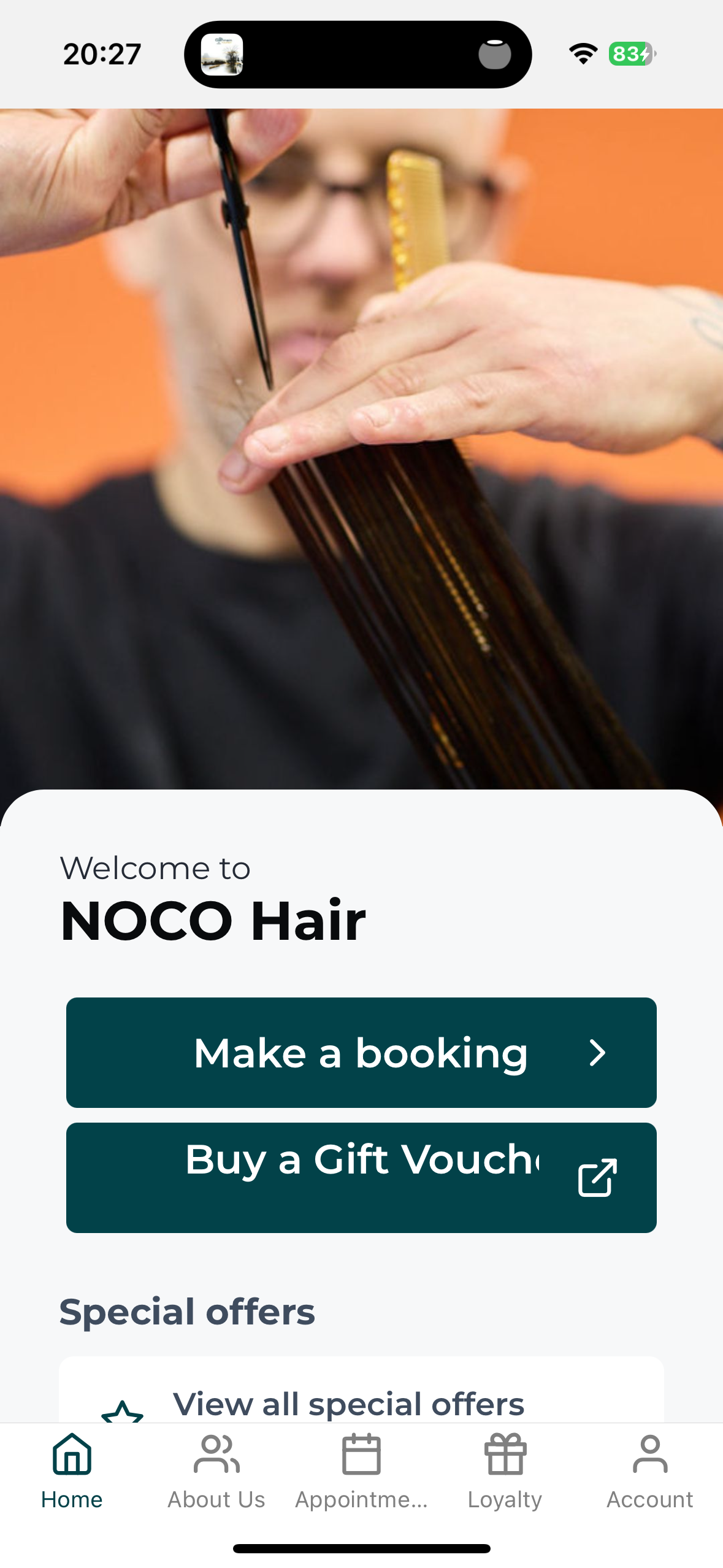
The NOCO Go app, our NOCO Hair booking app, lets you book, move or check your visit whenever it suits you, even at midnight when you suddenly remember. Two minutes of setup and you are away.
Step 1. Download the app
Search NOCO Hair in the App Store or Google Play and look for NOCO Go, or tap this link on your phone and it will take you to the right store automatically: Download the NOCO Go app.
Step 2. Get logged in. This is the bit that matters
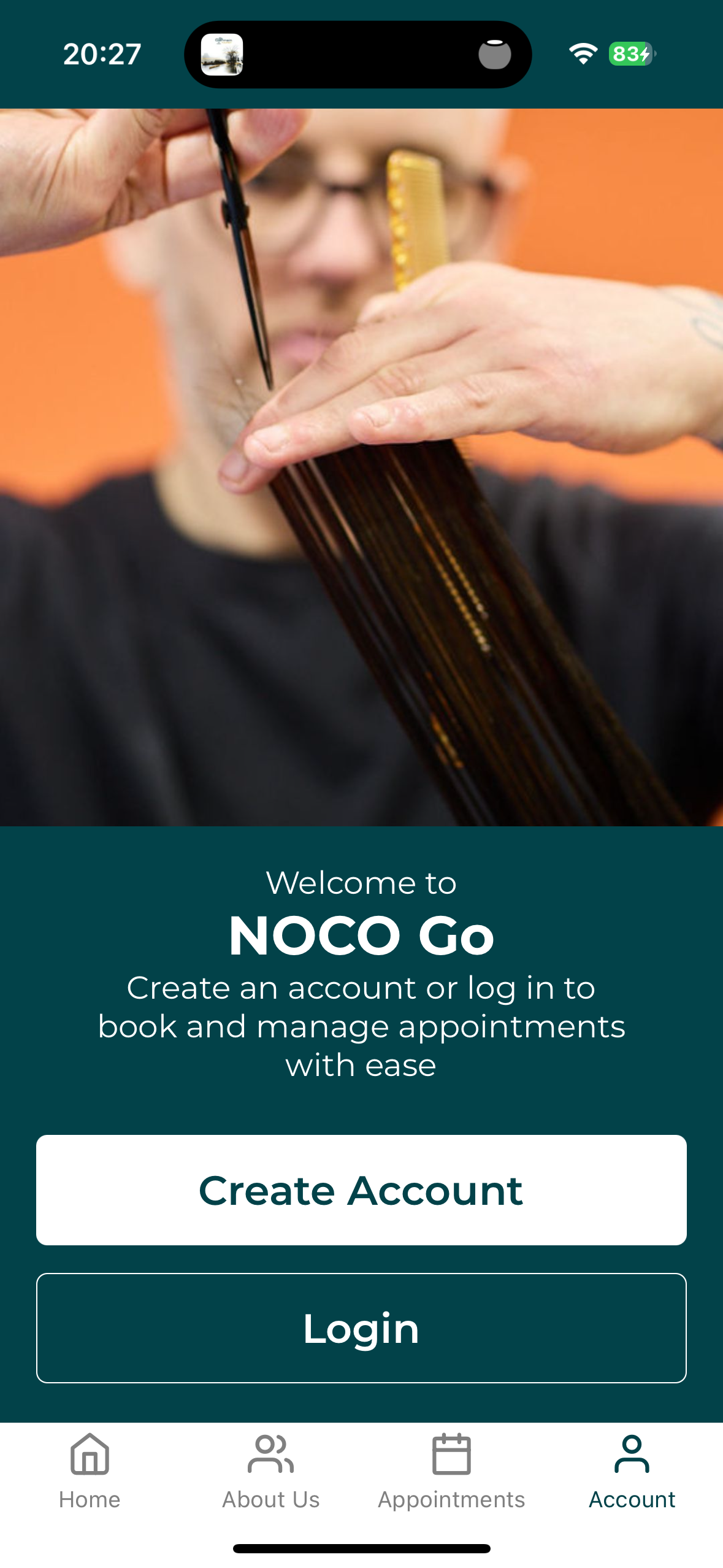
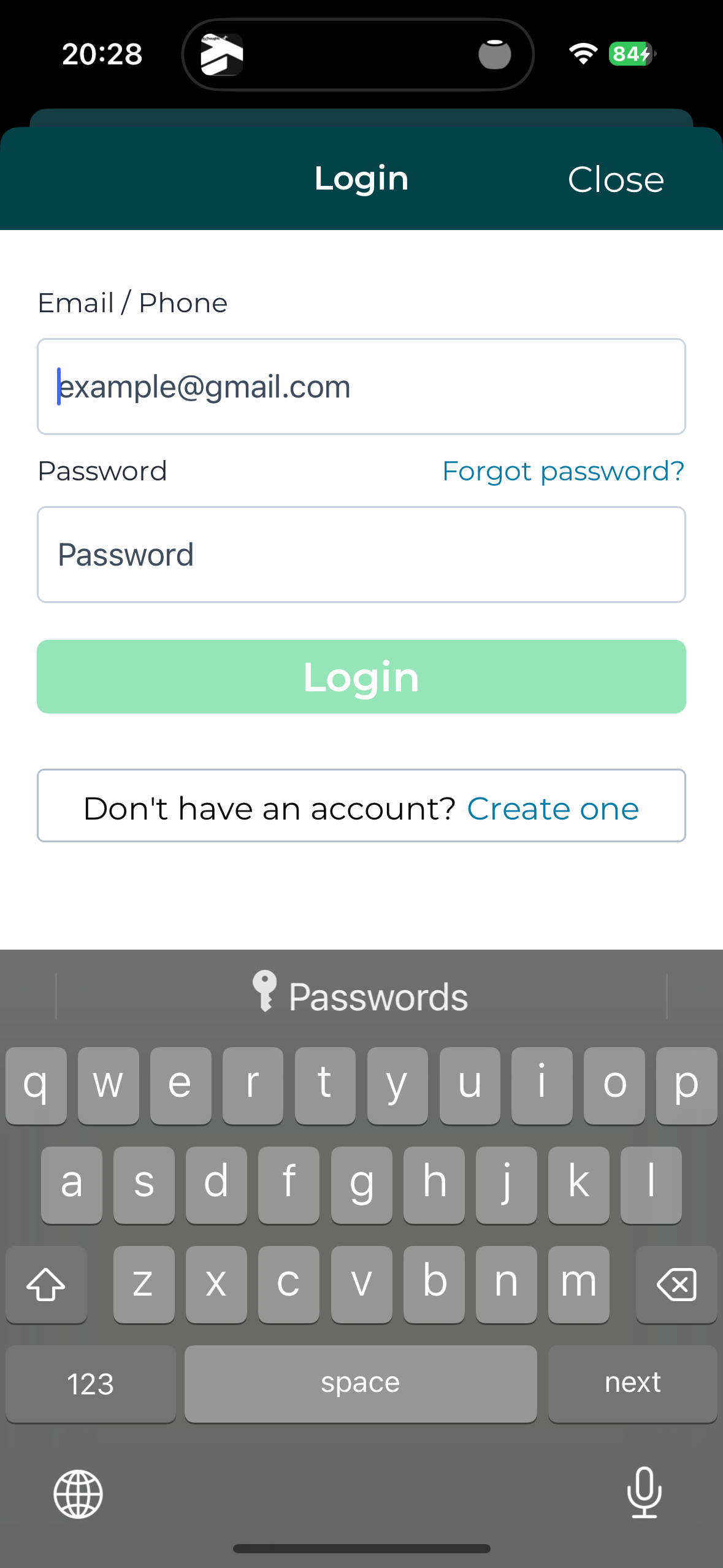
Been to NOCO before? Your details are already in our system, so do not create a new account. Tap Forgot password, enter the email we have for you, and set your password. That is it, you are in.
New to NOCO? Tap Create account and you are away.
Two doors. Been before? Yours is Login, then Forgot password.
The key insight
If you have ever had your hair done with us, the app already knows you. Forgot password is not just for forgotten passwords. It is how existing clients set their first one. Creating a new account with an email we already hold will just tell you the email is already registered.
Been before? This is your button.
Step 3. Book your visit
Choose your service, your stylist and your time. Done in under a minute. You can move or check your appointment from the same place whenever you need to.
Questions we hear a lot
App questions, answered
Why does it say email already registered when I create an account? That is your clue you are already in our system from a past visit. Go back and use Forgot password instead.
Why does the app say I have no past appointments? We changed our booking system a little while ago, so older appointments may not show in the app. Nothing is lost. Your full history is safe with us in the salon, and every booking you make from now on will show in the app.
I can’t find an appointment time that suits me. Can you help? Yes. Phone the salon. The app cannot show everything, and we can often do something once we talk to you.
I’m stuck logging in. Who do I ask? Reply to any of our emails or phone the salon and we will sort it. A real person, not a chatbot.
“The app is there to make your life easier, not to replace us. If it ever gets in your way, pick up the phone and a human will sort it.”
Noel Halligan · NOCO Hair Bristol
Call Us · 0117 403 0998
N
Written by
Noel Halligan
Creative Director and Co-founder · NOCO Hair Bristol
Noel Halligan is the Creative Director and co-founder of NOCO Hair in Bristol, with over 20 years behind the chair. He believes great hair starts with understanding, not guesswork, so every client begins with a proper consultation before any scissors or colour come out. His work comes down to one simple idea: better decisions lead to better hair.
Ready to Try It?
Download the NOCO Go app and your next appointment is three taps away. Prefer to talk to a human? Call us on 0117 403 0998 and we will book you in the old fashioned way.
Download the App
NOCO Hair · 147 Whiteladies Road, Clifton, Bristol